Building a sovereign AI RAG solution with self-hosted LLMs and UpCloud
Digital sovereignty and sovereign AI are crucial for EU organizations needing secure, compliant AI infrastructure. A self-assessment is a practical starting point for identifying capability gaps and priorities. Together with UpCloud, we moved beyond a simple assessment form and built a self-hosted RAG-based AI agent deployed entirely in Finland, demonstrating sovereign AI capabilities. This blog shares the technical details of the architecture, GPU infrastructure, and performance optimisation.

The concept is simple: we have a self-assessment form with 10 single-choice questions, based on European and US legislation and best practices. After the survey is completed, the customer can receive a detailed report with risks and recommendations, or discuss the results with the AI chatbot trained on the same topic-related materials and our internal company knowledge. With this setup, we aimed to demonstrate that modern systems can be deployed close to the business location. The system is available to be seen in action at sovereignty.futurice.com.
Building the sovereign AI architecture
As a base of the architecture for this solution, we decided to use the sovereign AI automation platform concept we described previously in our blog. This architecture relies on a managed Kubernetes service on UpCloud and n8n as an AI agent runtime and co-working platform. UpCloud provides servers with Nvidia L40S GPUs, which are capable of running quite powerful AI solutions. For our use, UpCloud has all the managed services we need for running a reliable and scalable system: S3-like object storage, PostgreSQL and Valkey (Redis alternative) in addition to Kubernetes and private networking. Check out the referenced blog post for more details – in this solution, the only addition was an extra simple Next.js-based frontend which connects to n8n via webhooks.
Retrieval-Augmented Generation (RAG) fundamentals
After the foundations are selected, and the UI development is a routine, the actual challenge is to develop a capable agent and select and deploy a powerful enough LLM and connect them together in a reliable and predictable setup. In order to do this, we would need to recall some fundamentals from neural network transformer architecture and RAG solutions. For a better understanding of LLMs, you can refer to Transformer Explainer with its nice visualisation.
So, we are building an AI agent which can reference the internal knowledge database to improve the answers and reduce hallucination. This well-known approach is called Retrieval-Augmented Generation (RAG). As a knowledge store, such solutions rely on vector databases, which store document chunks indexed by multi-dimensional numeric vectors called embeddings.
Embeddings are a way transformer models represent semantic and relations of tokens (word parts, symbols). Each token is parsed and transformed by a special layer in the LLM into such a vector in a large space with hundreds or thousands of dimensions. As these vectors represent semantics, it’s a good way to index the text chunk content and search for similarities in the database.
A single LLM can operate only as either an inference model or an embedding generator. Although the inference model can be run as an embedding generator, that is a waste of resources, and separate types of models are used. Such a generator is required in data ingestion pipelines and when the vector database is queried (to transform the prompt into a vector so the database can be searched by it). Therefore, in most of the RAG solutions, two models are needed instead of only one.
The next stage in the transformer architecture is covered by the attention mechanism, which dictates how the model weighs the importance of different tokens in a sequence. This is handled through three new, distinct vectors for each token:
- The Query represents what the current token is looking for to better understand its own context within the sentence. It acts as a set of semantic requirements.
- The Key represents what a token has to offer to other tokens. It acts as a broadcasted semantic signature or identifier.
- The Value is the actual underlying meaning or mathematical substance of the token.
LLMs generate outputs sequentially, predicting one token at a time based on all preceding tokens. Without optimisations, the model would have to completely recompute the Key and Value matrices for every single past token—including the massive RAG context injected into the prompt—at every generation step. To save massive amounts of compute, a KV-cache is used. It stores the calculated Key and Value vectors for the initial prompt and all previously generated tokens in the GPU memory, meaning the model only has to compute the QKV for the newest token.
Another widespread optimisation is prefix caching. Because the RAG AI agent relies on a consistent system prompt, specific behavioural guidelines, or even overlapping retrieved documents, multiple user interactions often share the exact same starting text. Prefix caching allows the serving engine to compute the KV-cache for this shared "prefix" just once and hold it in memory. When new requests arrive containing that same initial sequence, the system simply reuses the cached states.
Building a sovereign AI agent with n8n
A RAG agent is as good as its system prompt and underlying knowledge base. In many cases, efficient collaboration with the domain experts is much more important than the perfect technological base. As prompt engineering is becoming a necessary skill for experts outside of the engineering professions, breaking the usual “specify-implement-deploy-test” cycle could speed up delivery drastically.
Here is when platforms like n8n come into play. By providing a simple enough graphical interface for building and testing agents, it can help to decouple system prompt polishing, which requires in-depth domain knowledge, from the rest of the development. At the same time, n8n, being based on LangChain AI agent development framework, remains capable of building as complex systems as needed. In our workflow, we only needed to build a base for the agent, data pipeline and testing and then hand it over to sovereignty experts for fine-tuning.
The most important enablement pieces for efficient collaboration we found as follows:
Inbuilt n8n guardrails node which serves as a gatekeeper between the user and the agent, not allowing to pass by jailbreak attempts or topical misalignment. In particular, it allows to separate the logic of determining, whenever the user is asking questions about sovereignty or about something completely unrelated, from the agent's system prompt to a separate place, simplifying the main system prompt, making it more reliable and easier to work with. It relies on the same LLM in our case, and we had to highly customise default guardrail prompts to fit our needs.
Inbuilt chat interface which allows trying out the system prompt or tool description changes right away without the need to redeploy the agent or set up a local development environment.
Evaluations - a way to run a test dataset through the agent to track metrics. We used it to evaluate answer correctness, and whenever the agent is actually accessing the internal knowledge base to answer some specific questions. Our training set consisted of several tens of real customer questions frequently asked from UpCloud or Futurice. The interface of n8n allowed domain experts to create new test cases, execute tests and track metric changes with ease, making the interactive process of improving answers more predictable.
Although deployment of such a platform as n8n comes with performance and administrative overhead, we considered it valid for the case of a RAG solution, since we could use a free n8n plan, we’ve already had assets and experience for deploying and maintaining the deployment, and there is no noticeable performance overhead (the bottleneck is always LLM, not the agent runtime). Additionally, n8n provided an in-built queuing and request ageing mechanism to help to handle usage spikes critical for self-hosted LLM scenarios.
Efficient self-hosted LLM deployment with Qwen3 and vLLM
For our RAG scenario, we’ve had the following requirements for the LLM:
- We have an Nvidia L40S GPU provided by UpCloud with 48 GB of VRAM we need to fit our LLM(s) in.
- We need to co-host both the main inference model and a small embedding model on the same GPU because of the cost concerns.
- We need to deploy as powerful an LLM as possible while keeping enough capacity for parallel processing of multiple users.
For the models, we stopped at the Qwen3 family, which has both inference and embedding models:
- Qwen3-30B-A3B-Instruct-2507-FP8 - mid-size inference model with 30 billion parameters, out of which only 3 billion activate per generated token. This gives good pre-trained knowledge with fewer hallucinations while keeping the generation speed quite high. To fit into our GPU memory, we went for FP8 quantisation: storing weights as 8-bit floating point numbers, which helps to achieve a good size/accuracy balance.
- Qwen3-Embedding-0.6B - the smallest embedding model is enough, most of the benchmarks show that the overall RAG quality does not grow significantly with more weights added.
To co-host two models on the same 48 GB VRAM GPU, we need to take the following into account:
- Inference and embedding models take 30 and 1.2 GB of memory, respectively.
- Each model deployment takes ~0.3-3 GB of memory for CUDA runtime and service needs, depending on context length and other params, and in our case, is estimated at 0.4 GB for the embedding model and 2 GB for the inference model.
- KV cache for the ongoing queries is always stored in the GPU memory, so the more memory is reserved for it, the more parallel processing is possible.
We didn’t go for the Qwen3.5 family because the model best suited for our case has 35 billion parameters, which would take more space in the memory and reduce the capacity for parallel processing. But what’s more important, vLLM as of version 0.20 still does not support KV cache offloading for hybrid attention architecture models. And we didn’t go for Mistral models because they still suffer from incompatibility with n8n: Mistral does not support “Extra inputs” provided by n8n via vLLM’s OpenAI-compatible interface, so the tool calling is not working without tricky workarounds.
servingEngineSpec:
  runtimeClassName: "nvidia"

  # Allow up to 2 hours for model download on first start
  startupProbe:
    failureThreshold: 120
    periodSeconds: 60

  strategy:
    type: Recreate

  modelSpec:
  - name: "qwen3-30b"
    repository: "vllm/vllm-openai"
    tag: "v0.20.1"
    modelURL: "Qwen/Qwen3-30B-A3B-Instruct-2507-FP8"

    imagePullPolicy: IfNotPresent
    replicaCount: 1

    # vLLM is not using much CPU even under high load, but it has several processes and it's officially recommended to give it at least 2+N-GPU CPU cores to ensure maximal performance
    requestCPU: 3
    requestMemory: "48Gi"
    requestGPU: 0.9

    vllmConfig:
      # note: total usage by two models cannot be all the way to 1, because some space is needed for the cuda runtime
      gpuMemoryUtilization: 0.93
      enableChunkedPrefill: true
      enablePrefixCaching: true
      # in our testing, most of our agent runs don't exceed 12000 tokens, so setting the limit to small one we can free up some memory for more parallel processing
      maxModelLen: 16384
      extraArgs: [
        # we have only RAG scenario, we don't need multimodality, so we can save some memory by disabling it
        "--language-model-only",
        "--reasoning-parser", "qwen3",
        # In RAG relying mostly on retrieved knowledge, we don't need the model to "think" too much on its own, so we can save some memory by disabling it
        "--default-chat-template-kwargs", '{"enable_thinking": false}',
        # Use FP8 KV cache to halve attention memory bandwidth and free VRAM for more cache entries
        "--kv-cache-dtype", "fp8_e4m3"
        ]

    env:
      # Prevent PyTorch CUDA OOM from memory fragmentation at high gpuMemoryUtilization (also allows to allocate more memory for the model)
      - name: PYTORCH_CUDA_ALLOC_CONF
        value: "expandable_segments:True"

    # by enabling cache offloading to CPU, we can free up a lot of VRAM for more parallel processing and additional weights
    lmcacheConfig:
      enabled: true
      cpuOffloadingBufferSize: "30"

    pvcStorage: "40Gi"
    pvcMatchLabels:
      model: "qwen3-30b-pv"
    pvcAccessMode:
      - ReadWriteOnce

    # Tool calling configuration
    enableTool: true
    toolCallParser: "hermes"

    hf_token:
      secretName: "hf-token-secret"
      secretKey: "hf_key"

  - name: "qwen3-embedding-06b"
    repository: "vllm/vllm-openai"
    tag: "v0.20.1"
    modelURL: "Qwen/Qwen3-Embedding-0.6B"

    imagePullPolicy: IfNotPresent
    replicaCount: 1

    requestCPU: 1
    requestMemory: "4Gi"
    requestGPU: 0.1

    vllmConfig:
      # we set parallel batch processing to 50 in n8n to make it possible to free up more memory for inference model
      gpuMemoryUtilization: 0.05
      # we split documents by 2000 characters in n8n, which makes around 500 tokens, so no need for a larger model allocation
      maxModelLen: 600
      extraArgs: []

    # embedding model does not benefit from cache offloading
    lmcacheConfig:
      enabled: false

    pvcStorage: "5Gi"
    pvcMatchLabels:
      model: "qwen3-embedding-06b-pv"
    pvcAccessMode:
      - ReadWriteOnce

    enableTool: false

    hf_token:
      secretName: "hf-token-secret"
      secretKey: "hf_key"

routerSpec:

  tag: "v0.1.10"
  imagePullPolicy: IfNotPresent

  resources:
    requests:
      cpu: 400m
      memory: 800Mi # adding more memory than default to avoid OOMKilled issues
    limits:
      memory: 800Mi
The most interesting parts of this deployment:
- After reserving space for Cuda runtime and service needs (see gpuMemoryUtilization parameter values), the inference model takes 44.64 GB in total, the embedding model takes 2.4 GB.
- We free up some memory by disabling multi-modal capabilities of the Qwen3 model, as not needed for our text-only RAG.
- We are limiting model context length to 16384 tokens, as in our tests with heavy prompts, the context length never exceeded 10000 tokens for single queries with our database and system prompts. By limiting the context length, we can free up a lot of memory for parallel user processing.
- For the embedding model, the context length requirement depends purely on the chunk size in which we are splitting our documents; we are splitting them by 2000 symbols, so a 600 token cap is enough, and we can free the unnecessary VRAM.
- In the database as of the moment of writing the blog post, we have 8660 entries in the knowledge database (PostgreSQL with PGVector), making it to about 17.32 million characters or about 4.3 million tokens including overlaps in the chunks.
- fp8_e4m3 quantisation type for KV cache is used, which halves the cache size per token without a significant accuracy drop in RAG scenarios (confirmed by our tests) and allows for more parallel users.
- We have KV cache offloading to CPU enabled (see lmcacheConfig parameters); with this setup, vLLM offloads long-standing cache and cache for inactive sessions to system memory on the same machine instead of VRAM and loads it back only when needed, allowing parallel processing of many more users by switching between them on demand.
- vLLM is not sensitive to CPU, so we can co-host other applications, like n8n or Prometheus, on the same node, saving costs.
- free space for KV cache of the inference model is about 12.64 GB, which gives a theoretical limit of 25 parallel sessions processed by the GPU, assuming average token length is 10000, and 15 sessions in the worst case scenario of hitting the defined max model length.
This strategy was to fit a big enough model and leave enough space for the KV cache for parallel user processing. In more complex scenarios, we could add more replicas for the same model (to increase the parallel processing and reliability) or reserve a node with more than one GPU and host a bigger model (same model weights could be allocated to multiple GPUs, that’s how bigger models are deployed).
Benchmarking throughput and latency for self-hosted RAG
As said in the previous section, the theoretical limit of the in-GPU parallel sessions is from 15 to 25, but since we are offloading the KV cache to the CPU, the system should be able to handle much more. Sessions that do not fit into VRAM are offloaded to RAM and are transferred back and forth in a queue manner. So with 30 GB allocated for KV cache offloading, we should be able to (theoretically) handle 35-59 more sessions. But KV cache offloading transfers bottlenecks from GPU compute to memory transfer rates of RAM->VRAM path. We used k6 to test the performance of our agent and find a balance between parallel processing and comfortable response times. After that, we used the max parallel workflow limit on the n8n side to enqueue requests before they come to vLLM and increase the processing time of requests already being handled.
When doing the performance testing in our setup, one should be mindful of prefix caching: if we do the test with exactly the same prompts, they would be cached, which would be far from the real-life test when parallel users are making different prompts. Thus, we used 6 lengthy prompts, but added a random string to each of them during each test run. It made the system think the prompts are different and uncached. System prompts and document extracts from the knowledge database still are cached, but this is not too far from the real-life RAG case with small databases.
The setup of k6 is quite simple: 30 seconds we ramp up to 60 parallel users, maintain that load for 3 minutes and then ramp down to 0 users during 30 seconds, simulating a short usage spike. For comparison, we’ve done that in two scenarios: fully cached and prompt-uncached (cache miss). During the test, we were collecting metrics from Prometheus for analysis.
60 user amount was found to be optimal, because it allows to maintain stable average response time below 20 seconds in both scenarios. Details are presented below on the test result visualisation.
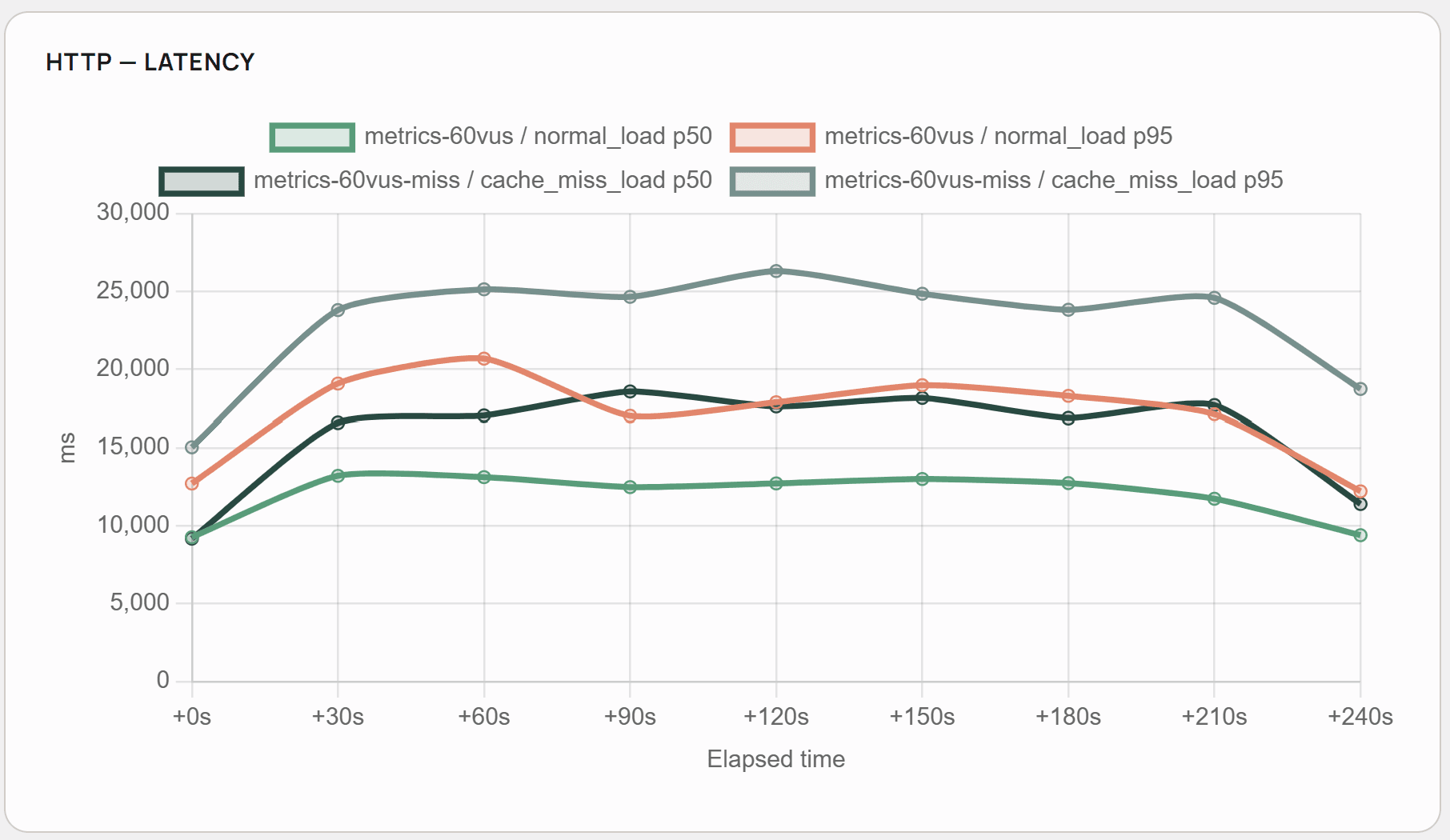
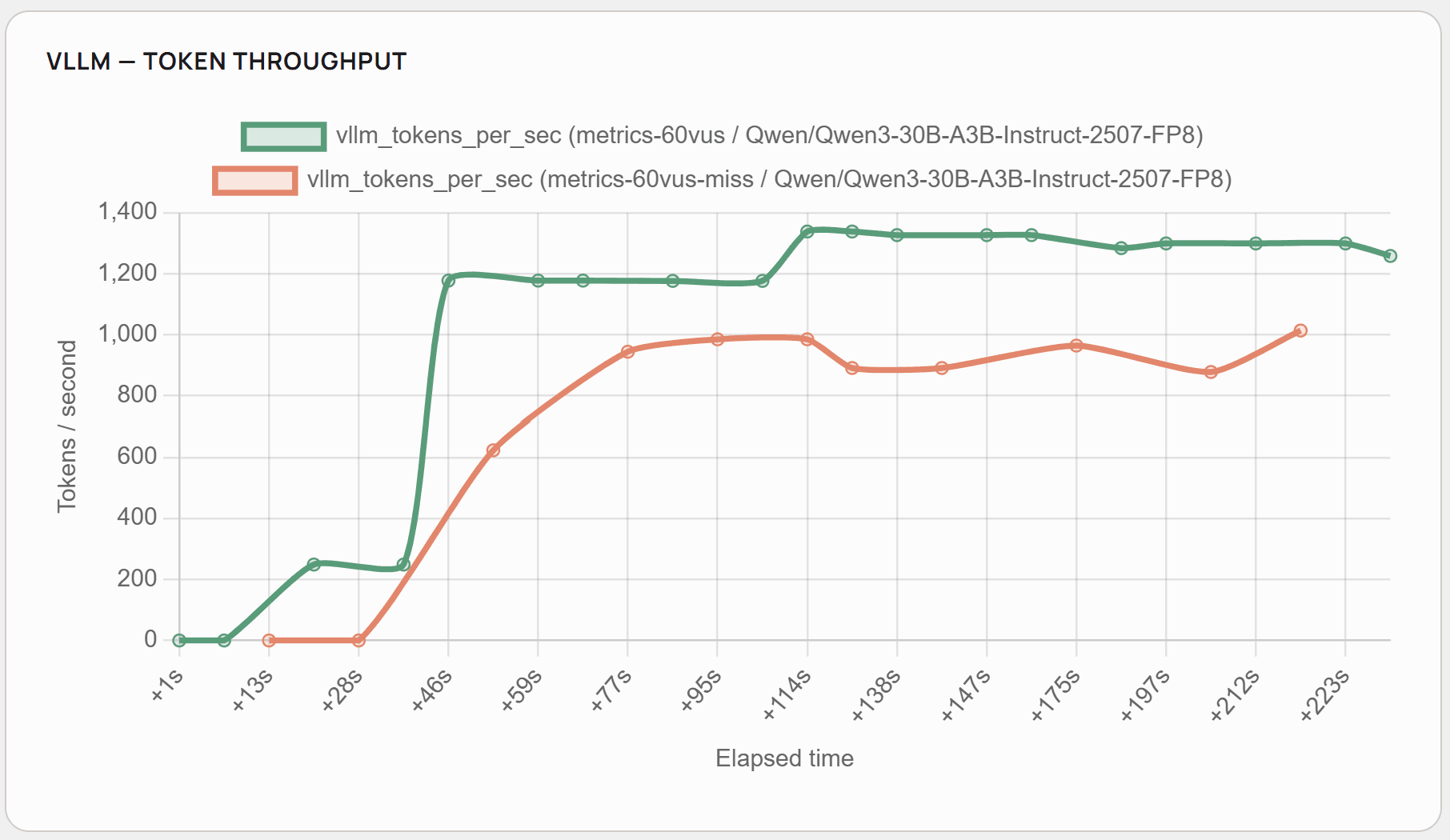
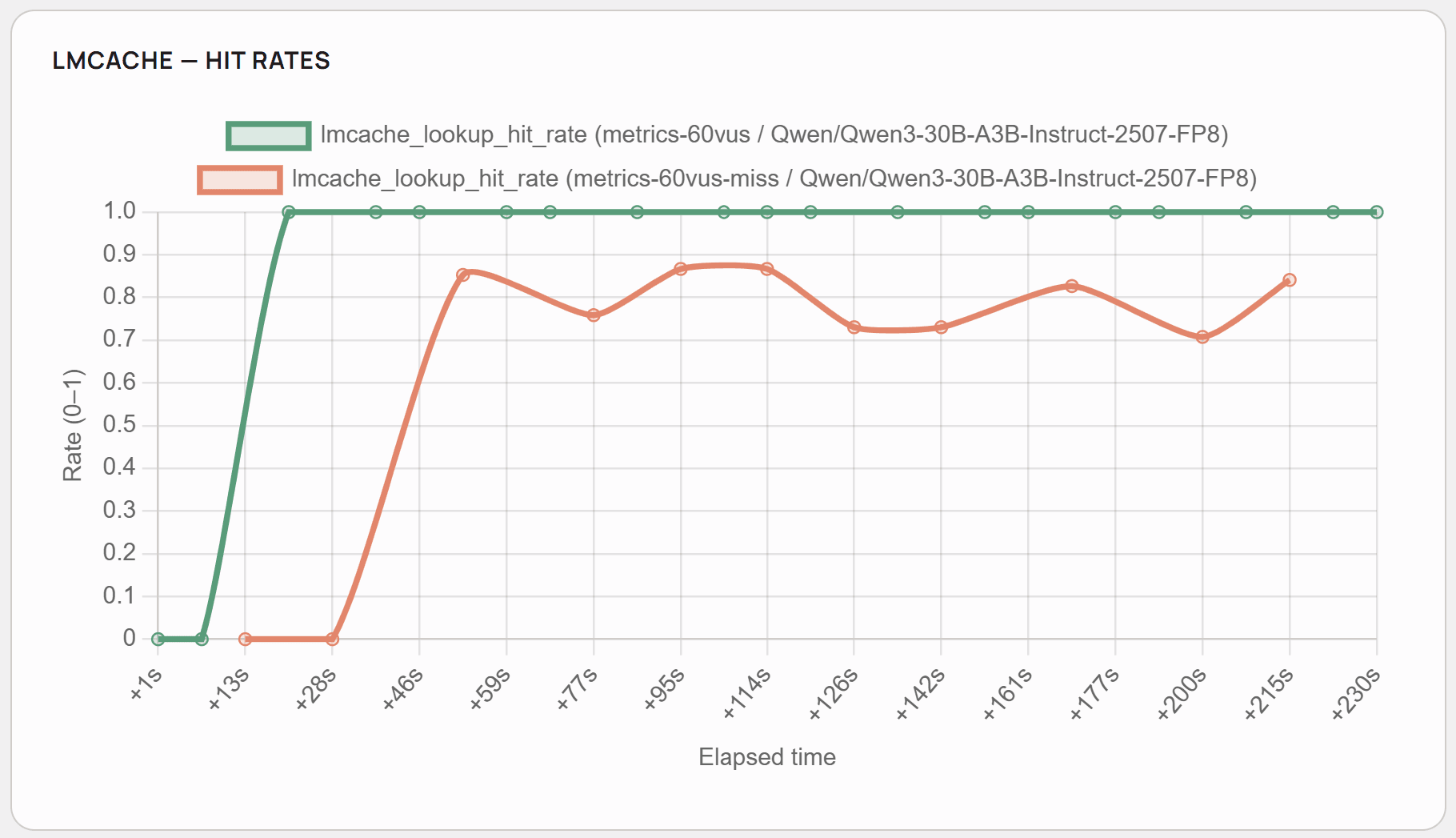
As presented, the cache hit rate stays at the average level of 0.8, and the system benefits heavily from system prompt and knowledge base documents caching. As seen in comparison with fully cached scenarios, 20% cache hit rate corresponds approximately to a 4-5 second improvement in the response time and 250-300 tokens per second more.
One more thing we found out during the test: each workflow run in n8n opens a connection to PostgreSQL to read documents and chat history from the database. Sometimes it’s more than one connection. In UpCloud, changing the max_connections parameter in PostgreSQL is locked, and it depends on the database plan. We had to use the second-to-smallest plan “1x1xCPU-2GB-25GB” to allow for 97 parallel connections to satisfy our target user base.
Cost comparison: self-hosted RAG vs GPT API pricing
Self-hosted LLMs have a significant difference in terms of return on investment compared to PaaS, which provides more flexible subscription-based or consumption-based billing models. At the same time, with large volumes, self-hosted models can become noticeably cheaper. Let’s see that in the example of our system.
We use a single GPU server in UpCloud with a price in Finland of 1.11 EUR/Hour=26.64/day. Full solution (with Kubernetes, simple database, load balancers, etc.) is taking 32.50 EUR/day. Our system supports up to 60 parallel users with an average token consumption of 9000 input tokens and 400 output tokens per request, with an average response time of about 18 seconds.
Let’s compare our Qwen3-30B model to a non-thinking GPT-5-mini on Azure with consumption-based pricing. We take this model because it was launched about the same time as Qwen3 and has similar non-thinking performance. Of course, we don’t take weight and KV cache quantisation into account when comparing performance, but our tests show they don’t have a significant effect on the RAG scenarios. Once KV cache offloading becomes available, it would be worth comparing Qwen3.6-35B versus GPT-5.4 mini, which is also more expensive than GPT-5 mini, but that would be a future exercise.
On Azure, GPT-5-mini is priced per 1 million tokens: input – €0.22, cached input – €0.03, output – €1.74.
Under constant full load, our system can handle about (606024/18)60 (total seconds/handling windowparallel users) = 288000 requests/day, 2880009000/1M = 2592 million input tokens per day and 288000400/1M = 115.2 million output tokens per day on average.
With GPT-5-mini on Azure, it would cost €570 per day for uncached input and €200 per day for output. If we assume that 50% of the input is cached, then the input would cost €324 per day for input or €524 in total. Each request would cost 0.22/1M9000/2 + 0.03/1M9000/2 + 1.74/1M*400=0.001821.
Considering these numbers, a self-hosted solution becomes economically meaningful already at 14700 requests a day, which is similar to 9 users polling the system without stopping 8 hours a day. And this is only taking LLM costs into account; in our solution, we get the additional benefit of hosting the website and n8n on the same compute node, adding to the savings for the overall solution.
Conclusion
As demonstrated in this blog post, building a fully sovereign AI platform with a self-hosted RAG architecture is both technically viable and economically practical for organisations with legal, compliance or security requirements. A combination of a self-hosted LLM with n8n as an agent backend is proven to be efficient both technically and in terms of collaboration with domain experts.
In the next blog posts, we plan to discuss a multi-cloud setup for GPU infrastructure for backup and scaling, along with latency tests.