Where the small stuff pays off: Getting started with Agentic DesignOps
Imagine that you had a new member on the team whose only job was to take on all of the high-frequency, low-complexity tasks that quietly eat away at your day. All those repetitive, time-consuming tasks that you can do with your brain on autopilot, that pull you away from the work that actually matters. What would you hand them first?
That question is more or less how we've come to think about agentic DesignOps across our design teams. You bring an agent into your design tools, hand it the mundane jobs you'd happily delegate if only you had someone to delegate them to, and in doing so buy back some time to free your designers up to focus on the bigger challenges.
So before you start wondering about all the big things AI might be capable of, it's worth asking yourself a much simpler question; what are the small day-to-day tasks that add up to you losing valuable chunks of time week in and week out?
Because in my experience, that’s often the best place to start.
Here are the Agent skills I'll refer to along the way:
- Component Bloat Eliminator, for trimming bloated variant sets down to size
- Component Frame Builder, for generating component documentation
- Flow Annotator, for annotating UX flows ahead of engineering handover
- Component Retrofitter, for swapping broken and placeholder components for proper library instances
- Token Architect, Library Generator and Token Docs Generator, our three-part suite for building and documenting variable libraries
- Variable Retrofitter, for replacing hardcoded values with library tokens (now largely handled by Figma natively)
What this is, and why now
Before we get into where to start with Agentic DesignOps, let's get on the same page about what we actually mean when we talk about DesignOps. There are plenty of good ones out there, but we keep coming back to Nielsen Norman Group's definition, which breaks DesignOps down into three broad areas; How we work together, How we get work done, and How our work creates impact. Of those three, the one that's most ripe for the picking when it comes to automation is that middle area, how we get work done.
So in the context of what we're calling agentic DesignOps, what we're talking about is bringing AI agents into our design tools, via an MCP server or natively, to help us get our work done.
Now, you might be thinking, "hang on a minute, Figma's MCP has been available for a while now", and you'd be right. Agents have been able to pull design context out of Figma to generate front-end code for some time, and while that's highly useful for handover, all of that benefit only ever flowed one way.
What those agents couldn't do was establish any meaningful connection back to our libraries and assets inside Figma and work on the canvas, and that, right there, is the key change. As of March this year, agents can now work directly on the Figma canvas using the very same tools we use ourselves, and best of all, they can do it alongside us, as real(ish) collaborators.
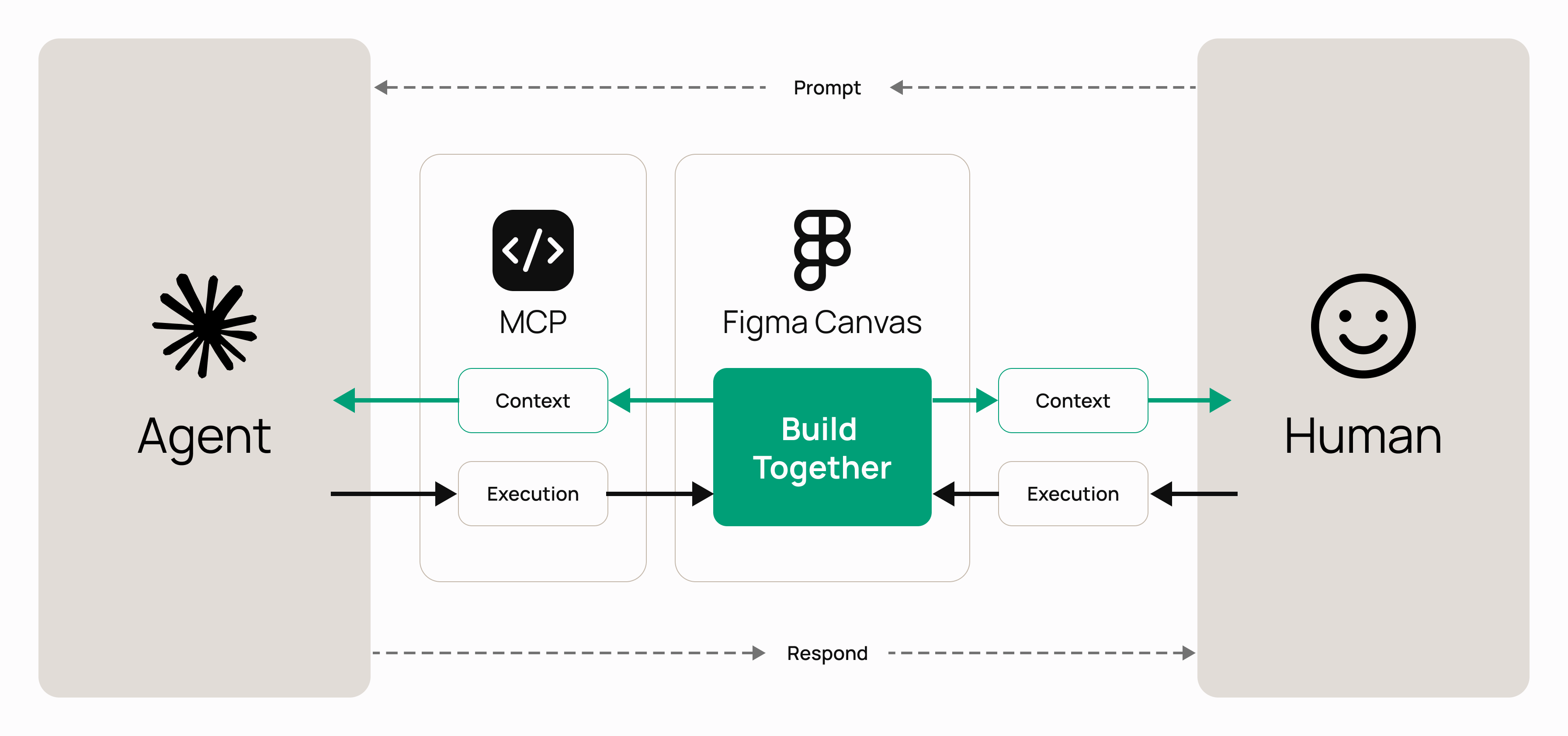
We've had tools that let agents create from a prompt for a little while, things like Figma Make, but the way you steered them as a designer was always pretty rudimentary. Any designer who's worked with these sorts of tools likely knows the pain of trying to use prompts to finalise a design, when you know that the quickest way to get the right results would be to get into that design and simply edit things by hand. While vibe-coding tools like Make certainly have their place in our new AI-powered design processes, the limiting factor is their one-directional approach to execution. The human prompts, while the agent does.
Having agents work on the canvas changes that. Unlike working with vibe-coding tools, it opens up the opportunity to evolve the way you currently collaborate with other designers (Humans), albeit this time that designer is an agent. You can quickly throw together a rough concept, hand it over to an agent to build on, then get straight back in yourself, working the way you always would to finalise the design, rather than funnelling your creative work through a prompt. That, for me, is what really unlocked the potential of these AI tools; being able to approach AI through the lens of evolution rather than revolution.
So if an agent can do almost anything a human can do in Figma, the possibilities really are endless (and daunting). When there's suddenly so much you could do, the golden question becomes what you should do. Where's the right place to start?
Start with the boring stuff
Picture a design lead trying to work out how to bring these tools into their team. Something genuinely powerful has just landed in their lap, and swirling around it is a whole bunch of noise. Medium posts, YouTube videos, some chancer building a fully functioning web app in an hour that somehow looks flawless. It's hard not to feel the pressure. Everyone seems to be doing everything with AI now, and it all looks so impressive, so surely you should be diving in and doing big, ambitious things too, right?
So you have a go at one of the big, impressive things, it doesn't quite do what the hype promised, and you come away underwhelmed, wondering whether you're just doing it wrong. But the truth is that kind of complex work genuinely does take a lot of time and effort to get right. And that instinct to think big isn't wrong either, it's exactly the sort of long-term thinking a good lead should be doing, it just isn't where you start.
Start instead with what you know. The low-hanging fruit, the repetitive, unrewarding jobs you do again and again without much thought. Automate a few of those and you'll see a return almost straight away, and the time they buy back is what gives you the breathing room to chase the bigger bets later, while your day-to-day automations quietly pay for themselves in the background.
What makes a good quick win
So what qualifies something as a quick win? For a start, it has to be genuinely time-consuming, because automating something only really pays off if it frees you up to spend meaningful time elsewhere.
If a task takes you ten seconds, handing it over to an agent saves you precisely nothing worth having. On top of that, it needs to be something you do often, because the value of a quick win is all in the repetition. These are the jobs you're doing week in and week out, the ones quietly eating into your day, and when you automate one of them, the time you claw back just keeps on adding up. And finally, it should be relatively low in complexity, because the tasks that are easiest to brief, the sort of thing you could comfortably hand to another designer with a sentence or two of explanation, are also the simplest to build a robust, reliable skill for. High frequency, high repetition, low complexity, that's what a proper piece of low-hanging fruit looks like.
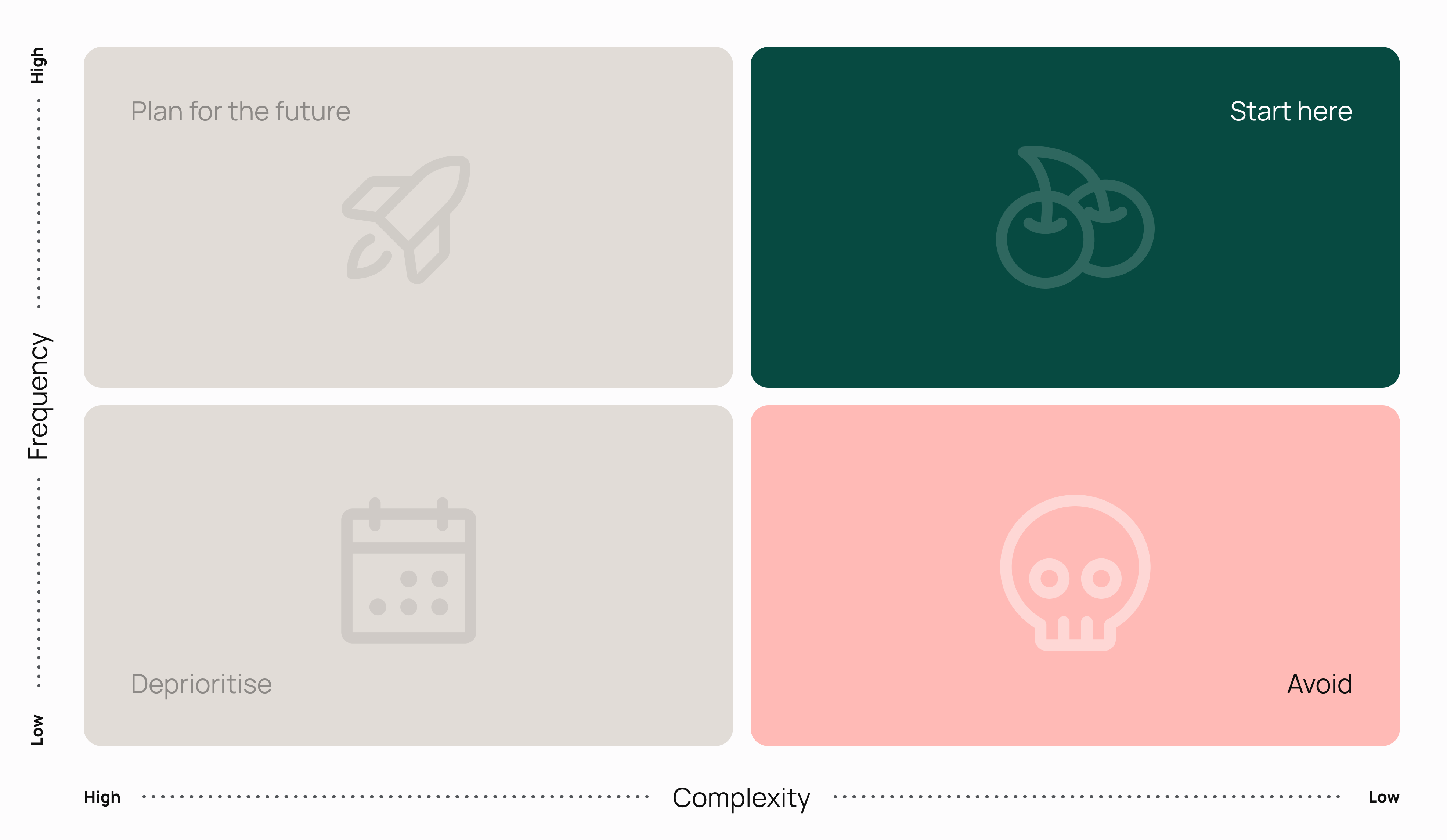
And this, really, is the crux of why these tasks are the right place to point an agent in the first place. A task that's highly repetitive and low in complexity is, almost by definition, a poor use of a designer's creativity. It's important work, it absolutely has to get done, but it doesn't need a human mind to do it. Let the agent take on the repetitive, mundane stuff, and give your people their headspace back for the kind of thinking that only they can do.
Something important to keep in mind when looking into the examples that we've created at Futurice, is that what actually counts as a quick win is going to be different for different teams. The repetitive jobs that eat up my week might be things you barely touch, and the ones that plague you might be things I never have to think about at all.
What it looks like in practice
The easiest way to show you what I actually mean by all this is to walk through a handful of the skills we've built and put to use ourselves.
Component Bloat Eliminator
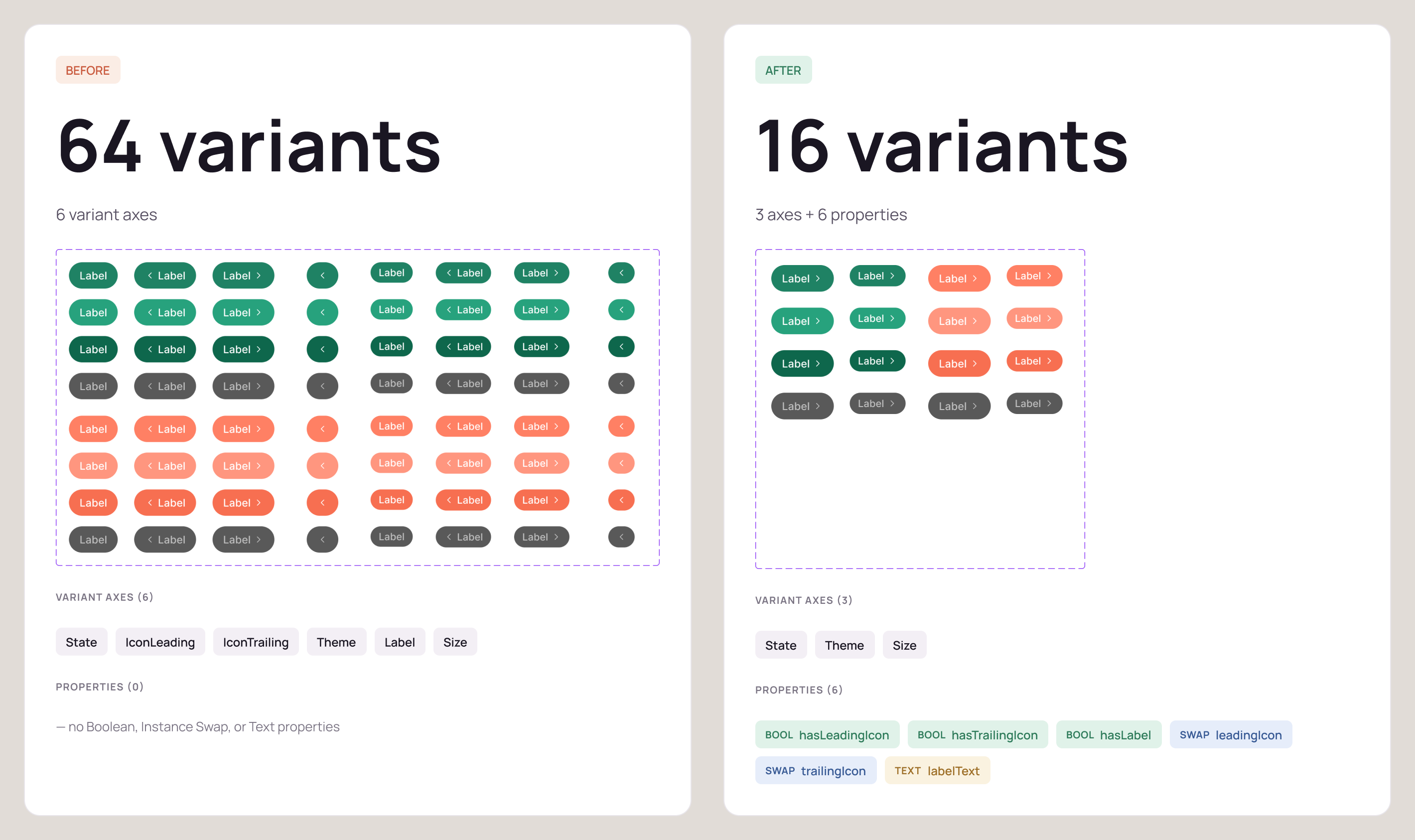
This was the very first thing we tried, our test case really. One of our clients had these huge component sets, created before layer properties had been introduced to Figma, that were crying out for optimisation. Button sets with forty-odd variants when they really should have had half that. Reducing something like that by hand, folding all of those variants down using layer properties and booleans, is a genuinely time-consuming job, and it's exactly the sort of thing designers tend to skip, missing all the little opportunities to simplify a set along the way. So we built an agent to have a go at it, and the results were impressive. But the scope of a skill like this extends beyond legacy components. Now, whenever a designer finishes building a new component, they can run the Bloat Eliminator over it as a quick sense-check, something to spar with, to see whether there's any room to trim or simplify what you've just made.
Component Frame Builder
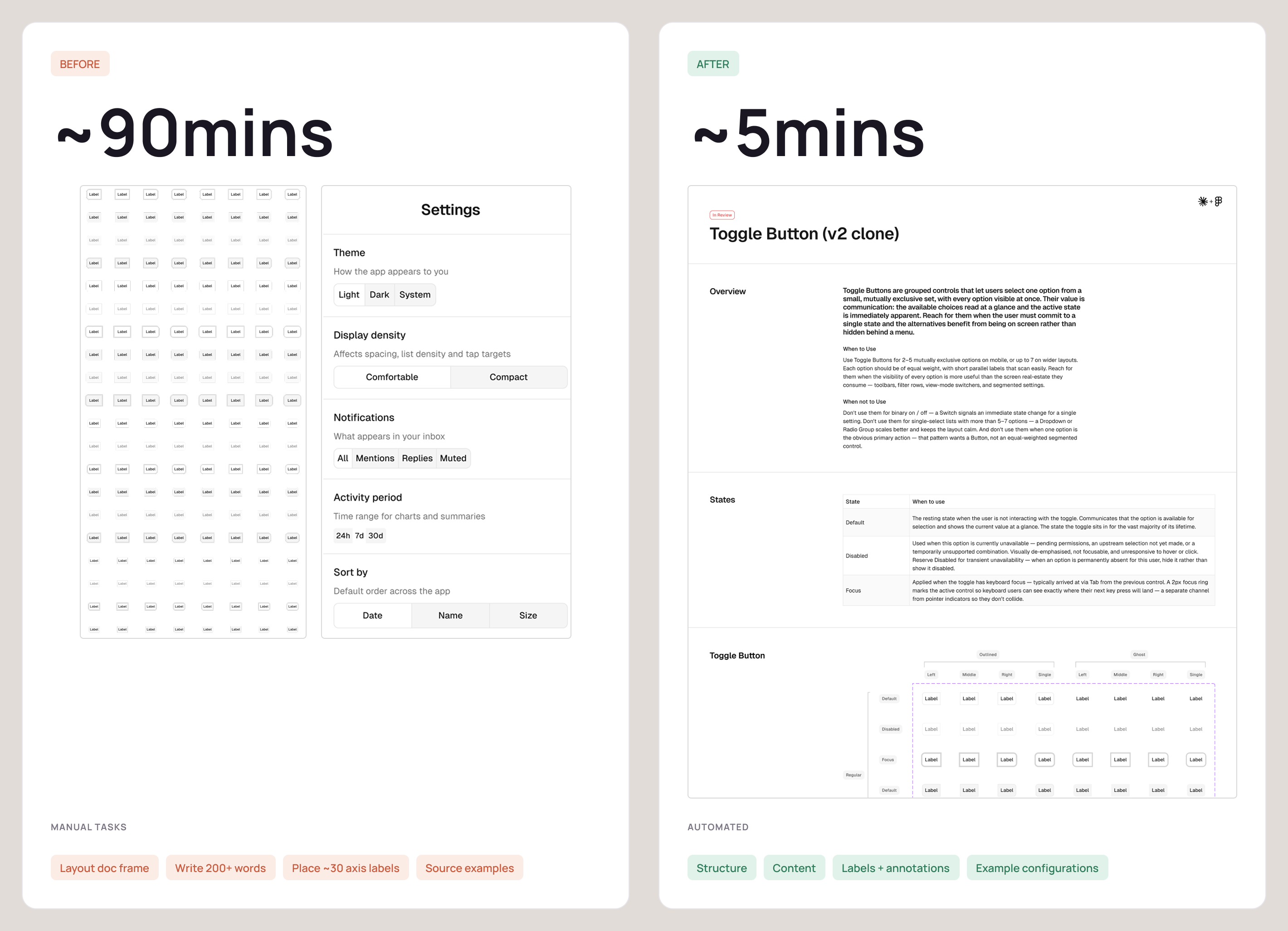
Documentation is one of those relentless, never-ending jobs when you're managing a component library. Every new or updated component needs a frame explaining what it is, how to use it, how not to use it, and how it can and can't be configured, along with in-situ examples and a label on every last variant, and it is, frankly, the archetypal high-frequency, low-complexity task. With this skill, you give the agent the components you want to use and a few examples to model on, and it drafts out the documentation for you, drawing on established best practices for common elements like buttons, reading the master component's properties to work out and document its various states, annotating every variant across its different axes, and even pulling in-situ examples straight from your design files with the configuration noted underneath each one. The first pass will always need a human to come in and polish it, of course, but the heavy lifting, the setting up of the frame, adding the content, and annotating the whole lot, is already done. It's exactly the kind of work I'd happily hand to another designer and then come back to finish off together.
Alongside the documentation a human reads, the skill also writes a machine-readable version of the same thing, a structured spec attached to the component that an agent can build against. So designers get the prose they use to understand a component, and an agent gets a spec it can build from in code.
Flow Annotator
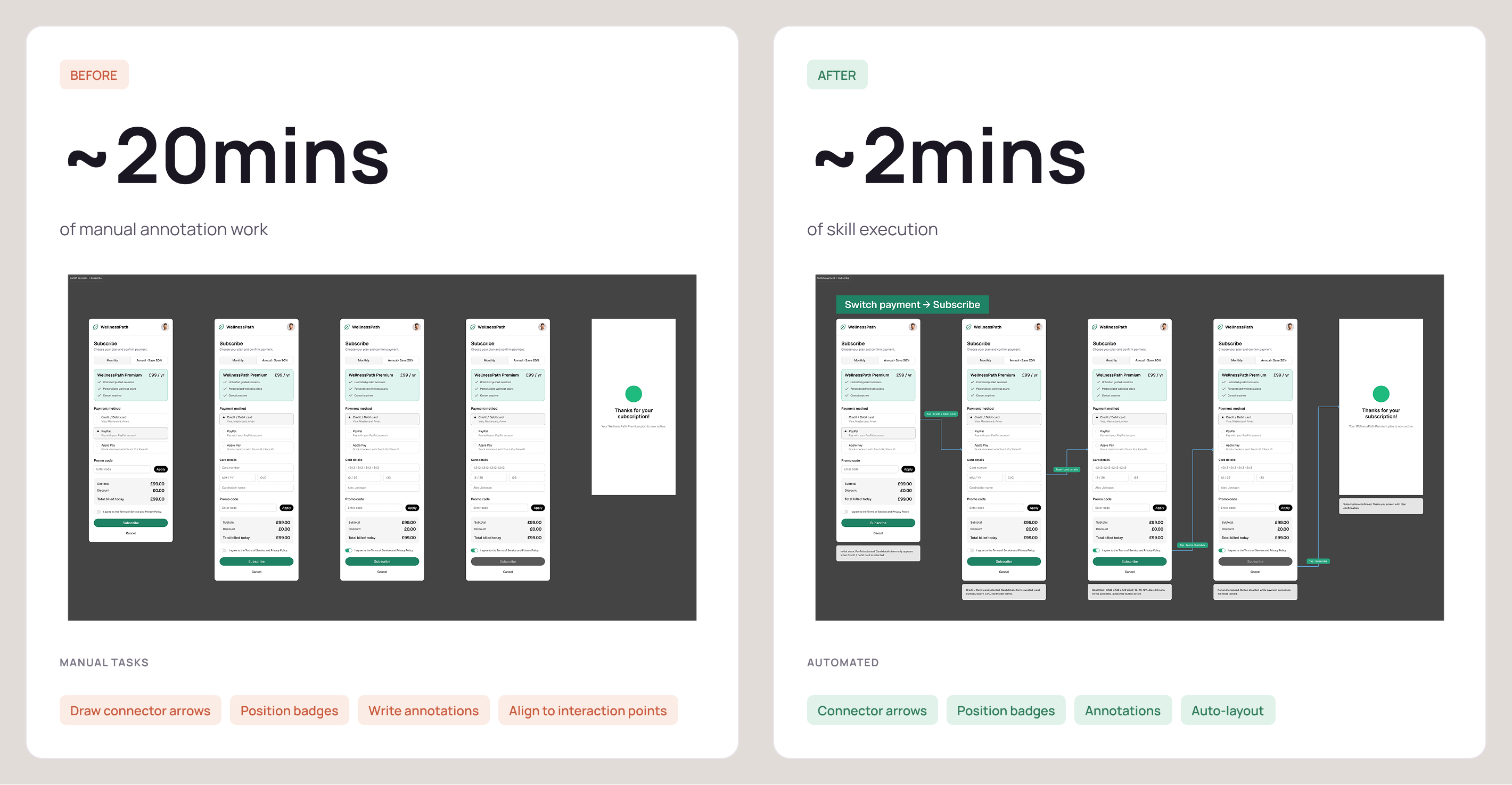
Whenever we map out a UX flow, we draw connectors between the screens and annotate each and every step; someone tapped this, dragged that, clicked here, and here's what changed on the screen as a result. That annotation is what gives the engineers the context they need to actually build the thing, whether the engineer in question happens to be a human or, increasingly, an agent of their own. Writing all of that out, screen after screen after screen, is slow and repetitive work, so we built an agent to lay that whole layer in for us, drawing the connectors and drafting up a description of each interaction and what it changes. We still read back over it and tidy up the wording, naturally, but the genuinely tedious part, capturing every single step in writing, is taken care of.
Component Retrofitter
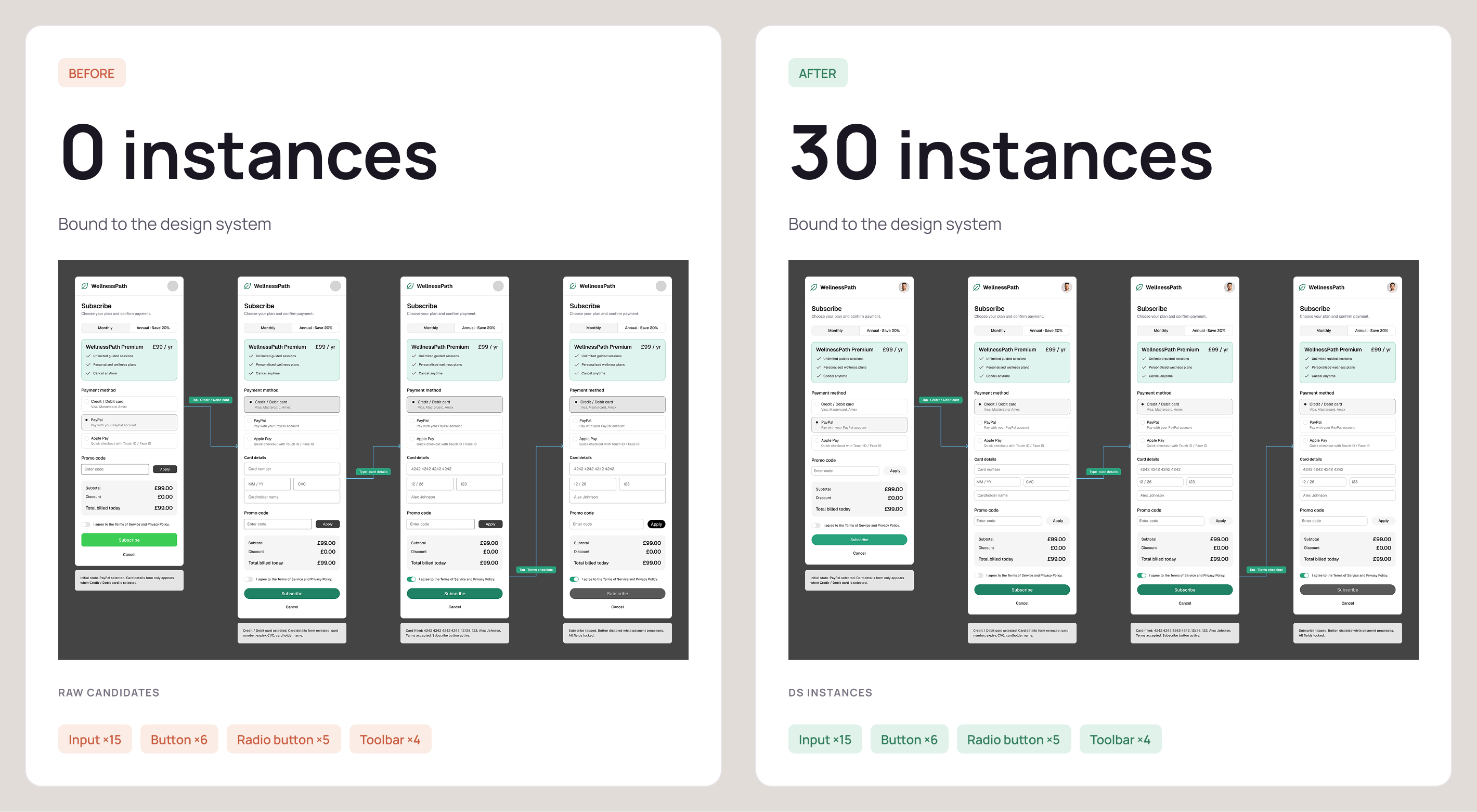
When we're doing conceptual work, we like to move fast and a little bit loose. Even with a library right there to hand, we'll happily break components apart, bolt things together and try ideas out at speed, just to get something in front of people and gauge their reaction to it. The cost of working that way always comes later though, when you have to go back and tidy everything up, swapping out all the broken and placeholder components for the proper library ones. So we built a skill to handle exactly that clean-up, scanning through the file for any raw, broken or stand-in components and switching them out for the correct library instances. It's fiddly, thankless work that an agent will happily take off your hands, which means the quick-and-dirty stays quick without leaving a great mess behind for someone to clear up afterwards.
Building and rebranding libraries
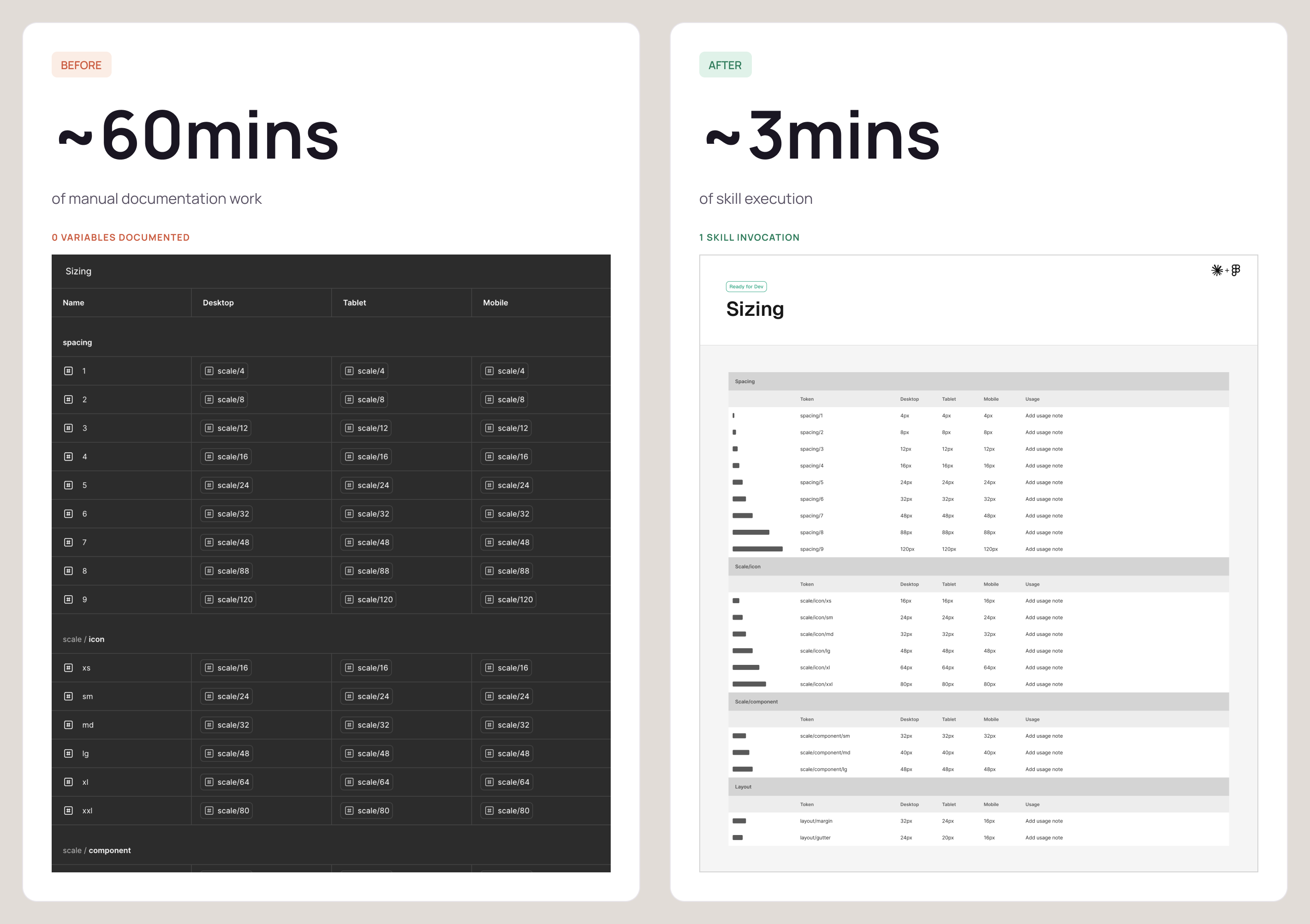
As a consultancy we're forever building and rebuilding libraries, and structuring all those tokens then building them out into variable collections, with all their various modes, in Figma is slow, repetitive graft. Anyone who's typed hex codes into Figma's variables menu by hand knows how painful that is, so a clear quick win for us was building a suite of three skills to handle this:
- Token Architect to work out how the tokens should be structured
- Library Generator to build them out into Figma as proper variable collections with their modes
- Token Docs Generator to write up all the documentation
This is repetitive work for us, but a team building their very first library would still get plenty out of these skills, the only real difference is how often the payoff lands.
When the platform catches up
Not every skill we build is destined to have a long and happy life, and that's absolutely fine. We built ourselves a Variable Retrofitter to swap out hardcoded values for the correct library tokens, and we did get a bit of use out of it, but before we'd even really put it through its paces, Figma went and shipped Check Designs, which does more or less the same thing natively. So we set our version aside without a second thought. That isn't a failure though, it's the entire logic of betting small in action. A quick win is cheap enough to build that even a few months of value out of it is well worth having, so if the platform catches up and quietly takes the job off your hands, you've lost nothing at all. Sink three months into some grand moonshot only for the very same thing to happen, and I promise you it stings rather differently.
The honest bit: cost, payoff and risk
What it costs to build
Now, none of this comes for free. Beyond the fact that right now companies like Figma are giving away AI tokens for free to get you hooked before they put up paywalls, there's a significant cost in human effort to build effective skills.
You can draft a new skill relatively quickly with a well written prompt, but as with any new process it needs rigorous testing to capture edge cases and establish reliability. A skill needs assets to test itself on and an environment to run those tests in. A skill needs evals, which is really just a repeatable set of tests that prove it gets the right result every time, not just the once. If you've ever written acceptance criteria for a component, or a definition of done, it's the same idea; a clear bar the work has to clear before you'll trust it.
And all of that takes real time, which is the hard part because it’s often in such short supply. Most teams are already up against it with business-as-usual work, deadlines and forever shifting priorities, and carving out the space to build robust, well-thought-out agentic workflows is a real challenge. This, if I'm honest, is where a lot of these efforts have the chance to quietly fall apart. If the time to focus on them is never properly protected, the skills never get built properly, and so they never actually deliver.
Proving the payoff
This is precisely why choosing the right quick win matters as much as it does. You need something with a genuine, long-term payback, because it's that payback that justifies carving out the time to build it in the first place. Get that call right and the upfront investment pays for itself many times over. Get it wrong, and it's a chunk of effort you couldn't really spare, spent on something that never warranted it.
So how do you know whether that payback is actually real? You put some numbers behind it. The promise of these AI workflows tends to come wrapped in an awful lot of hype, and the surest way to cut straight through that is simply to measure. Take one of those high-frequency, low-complexity tasks, track how much time your team genuinely spends on it over the course of a few weeks, and put a firm figure against it. Then multiply that figure out across a whole year, and suddenly you're looking at the real, annual cost of that one task, in both hours and money. That number is what lets you and the wider business make a properly honest call. If building a skill to automate the thing takes, say, a couple of weeks, does the annual cost it strips out justify the effort? Sometimes the answer will be a straight no, and that's absolutely fine, you've just saved yourself a job. But more often than not, once you've seen that yearly figure written down in black and white, the case rather makes itself. A fortnight's work to claw back weeks of repetitive effort every single year is a remarkably easy investment to defend, and once you've proven it out on one task, you've got both the method and the confidence to run the very same numbers on the next.
Why the risk is low
The other reason this is such an easy win, compared to most AI initiatives, is that it asks so little of you. Revolution, after all, is a big ask; completely overhauling the way a team works carries a serious cost, and it takes preparation, training, practice and no small amount of iteration to pull off well. For a team that's already stretched thin, that's an enormous amount to take on. It isn't the wrong ambition, exactly, it's just a very heavy one. Evolving bit by bit, on the other hand, is a far safer bet. You're not ripping everything up and starting over, you're not switching tools, and you're not asking anyone to change the way they work; you're simply handing a few of the things you already do over to an agent. That's a much gentler change for a busy team to absorb, and a far easier one to sell upwards, too; the tools stay put, the process stays put, and the productivity quietly ticks up. That, at its heart, is what this whole approach really is, a way of banking the promise of AI inside the tools and workflows you've already got, rather than betting the house on some brave new way of working. And those small changes are the foundations that the big changes eventually get built on. Hand off the drudgery, free up the time, and you've bought yourself the safe, stable space you need to go and explore the sweeping stuff whenever you're finally ready for it.
Why our skills travel
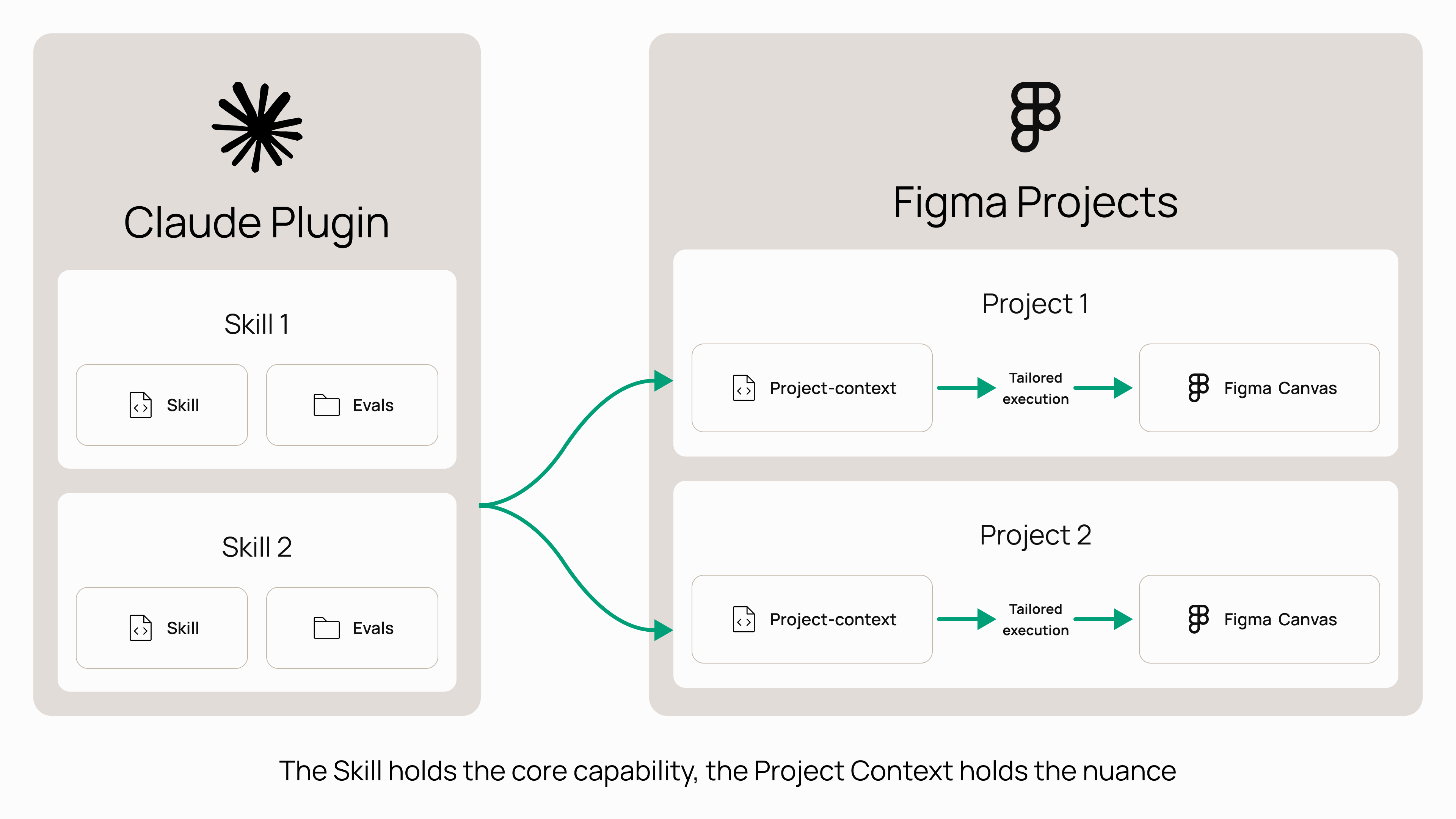
It's also why we've been so careful to build our skills to be reusable. As a consultancy we're running these same sorts of jobs across a whole host of different clients and products, so a skill that only ever worked in one single file would be next to useless to us. So we build them in two parts. The skill itself holds the core capability and the rules of how it operates, all the bits that don't change from one project to the next, while a separate project-context file carries all the bits that do; which library to use, the brand in question, the particular product's own conventions and quirks. Point that same skill at a brand new project, with its own context file sitting alongside it, and it simply adapts itself to fit. That separation is the thing that makes them genuinely scalable, and it's what lets us turn up to a new client with a tested, working skill on day one, rather than spending weeks building and proving one from scratch.
Finding your own
Which brings me neatly back to something I flagged right at the start. The skills I've walked you through here are the ones that happen to fit our world. As a consultancy, helping clients build, enhance and manage their libraries comes around again and again, and that's precisely why we automated it. Your world is almost certainly a different one; our low-hanging fruit might be a whole lot different to yours (🤨).
So the real lesson is in nurturing the habit of looking for these opportunities in your own world, and the best people to spot them are the practitioners, the ones on the ground working in the design tools day-to-day. Where, in your week, does the same repetitive, low-complexity work keep landing on your plate?
If you're on a product team, handover is very often a good place to look; all that preparing and pairing-up of assets to pass over to your engineering team, and increasingly the business of moving that work out of Figma and into other tools as you go. If you're working on a design system, your quick wins are far more likely to be maintenance jobs; optimising components, reducing variant sets, reaching for layer properties, and the endless checking that the right variables are in use and the documentation actually exists. Different world, different tasks, but exactly the same underlying idea. The principle holds wherever you happen to be working, find the work that's regular, low in complexity and quietly eating your time, and start there.
For us, all of this is starting to change the way we work with our partners. Alongside delivering the work and embedding within their teams the way we always have, we're increasingly looking for ways to help them get a foothold in agentic DesignOps of their own.
We now have the opportunity to work with teams to find the highest-value opportunities for automation hiding inside their existing ways of working, and then build those AI powered improvements together. And the skills we've already built mean we're not starting from a blank page, they give us a solid foundation to retrain on a partner's own brand language and the particular nuances of their problems, which gets a team off the ground a whole lot quicker than starting from scratch each time. So if any of this is sounding like your world, and you're not already working with us, it's very much the sort of thing we can help with.
But honestly, whether you go and build these things with us or entirely on your own, the move is exactly the same. Take a good look at your own week, find the drudgery, all that repetitive stuff you'd happily hand off to someone else in a heartbeat, and start there.